[Java_Basic]메소드의 오버로딩과 String 클래스(윤성우의 열혈 Java 프로그래밍)
메소드 오버로딩
메소드의 이름이 같아도 매개변수 선언이 다르면 메소드 호출문의 전달인자를 통해서 호출된 메소드를 구분할 수 있다.
Class MyHome{
	void mySimpleRoom(int n){...}
    	void mySimpleRoom(int n1,int n2){...}
	void mySimpleRoom(double d1, double d2){...}
}
매개변수의 수가 다르기 때문에 성립한다.
void mySimpleRoom(int n){...}
void mySimpleRoom(int n1, int n2){...}
매개변수의 형이 다르기 때문에 성립한다.
void mySimpleRoom(int n){...}
void mySimpleRoom(double d1){...}
다음과 같은 경우는 데소드 오버로딩이 성립하지 않는다.
int simpleMethod(){...}
double simpleMethod(){...}
반환형이 다른것이기 때문에 기준에 해당되지 않는다.
오버로딩된 메소드 호출시엔 전달인자의 자료형과 매개변수의 자료형을 일치시키는 것이 좋다.
class Person{
	private int regiNum;	//주민등록 번호
	private int passNum;	//여권 번호

	Person(int rnum, int pnum){
		regiNum = rnum;
		passNum = pnum;
	}
	Person(int rnum){		//주민번호는 있지만 여권번호는 없는 경우
		regiNum = rnum;
		passNum = 0;
	}
	void showPersonalInfo(){
		System.out.println("주민등록 번호 : " + regiNum);

		if(passNum != 0)
			System.out.println("여권 번호 : " + passNum + "\n");
		else
			System.out.println("여권을 가지고 있지 않습니다. \n");
	}
}

class ConOverloading{
	public static void main(String[] args){
		//여권 있는 사람의 정보를 담은 인스턴스 생성
		Person jung = new Person(335577,112233);

		//여권 없는 사람의 정보를 담은 인스턴스 생성
		Person hong = new Person(775544);

		jung.showPersonalInfo();
		hong.showPersonalInfo();
	}
}
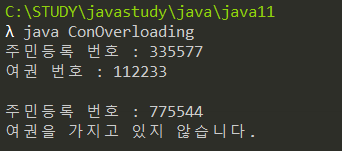
결과
키워드 this
class Person{
	private int regiNum;	//주민등록 번호
    private int passNum;	//여권 번호

    Person(int rnum,int pnum){
    	regiNum = rnum;
        passNum = pnum;
    }
    Person(int rnum){
    	regiNum = rnum;
        passNum = -;
    }
    void showPersonalInfo(){...}
}
이 중에 두번째 부분을 다음과 같이 대체할 수 있다.
Person(int rnum){
	this(rnum,0);		//rnum 과 0 을 인자로 받는 다른 생성자를 호출
}
this 는 오버로딩 된 다른 생성자를 의미한다.
this를 이용한 생성자 정의를 통해 중복된 코드의 수를 줄이는 효과를 얻을 수 있다.
this를 이용한 인스턴스 변수 접근
class SimpleBox{
	private int data;

	SimpleBox(int data){
		this.data = data;
	}
	void setData(int data){
		this.data = data;
	}
	int getData(){
		return this.data;
	}
}

class ThisInst{
	public static void main(String[] args){
		SimpleBox box = new SimpleBox(99);
		System.out.println(box.getData());

		box.setData(77);
		System.out.println(box.getData());
	}
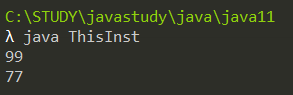
}
인스턴스 변수로 data가 호출
class SimpleBox{
	private int data;

	SimpleBox(int data){

	}
여기서 data는 매개변수 data를 의미함 (SimpleBox(int data))
class SimpleBox{
	private int data;

	SimpleBox(int data){
		this.data = data;
	}
여기서 this.data 는 인스턴스 변수 data 를 의미함 (private int data)
String 클래스
String str = new String("Simple String")
System.out.println(str);
이는 아래와 동일하다
String str = "Simple String";
class StringInst{
	public static void showString(String str){
		System.out.println(str);
		System.out.println(str.length());
	}

	public static void main(String[] args){
		String str1 = new String("Simple String");
		String str2 = "The Best String";

		System.out.println(str1);
		System.out.println(str1.length());		//length의 반환 값을 인자로 전달
		System.out.println();			//단순히 '개 행' 이 이뤄진다.

		System.out.println(str2);
		System.out.println(str2.length());
		System.out.println();

		showString("Funny String");		//String 인스턴스 생성 후에 메소드 호출
	}
}

메소드 println은 오버로딩이 되어있기 때문에 다양한 인자를 전달받을 수 있다.
Immutable 인스턴스(변경할 수 없는)
class ImmutableString{
	public static void main(String[] args){
		String str1 = "Simple String";
		String str2 = "Simple String";

		String str3 = new String("Simple String");
		String str4 = new String("Simple String");

		if(str1 == str2)
			System.out.println("str1 과 str 2는 동일 인스턴스 참조");
		else
			 System.out.println("str1 과 str2는 다른 인스턴스 참조");

		if(str3 == str4)
			System.out.println("str3 과 str 4는 동일 인스턴스 참조");
		else
			 System.out.println("str3 과 str4는 다른 인스턴스 참조");
	}
}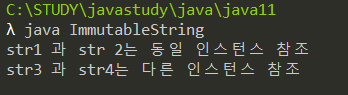
두 생성 방법에 차이점은 다음과 같다
먼저 방법은 같은 인스턴스를 참조하는 것을 알 수 있다.
String 은 Immutable 인스턴스이기때문에 변경할 수 없다
따라서 같은 인스턴스를 참조한다고 해도 어차피 변경할 수 없는 아이이기 때문에 상관이 없다.
String 클래스의 메소드
Concatenating(concat) : 문자열 연결
두 문자열을 연결시킨다.
class StringConcat{
	public static void main(String[] args){
		String st1 = "Coffee";
		String st2 = "Bread";

		String st3 = st1.concat(st2);
		System.out.println(st3);

		String st4 = "Fresh".concat(st3);
		System.out.println(st4);
	}
}
Substring : 문자열 일부 추출
class Substring{
	public static void main(String[] args){
		String st1 = "abcdefg";
		String st2 = st1.substring(2);
		System.out.println(st2);

		String st3 = st1.substring(2,4);
		System.out.println(st3);
	}
}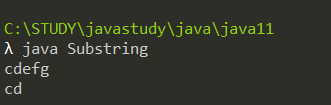
(2,4) 일 경우 2~3 까지. 뒤에있는 숫자 앞까지 추출한다.
Comparing : 문자열 내용 비교
equals : 문자열 같은지 다른지 비교
compareTo : 사전 편찬 상의 순서를 비교하여 내용 일치하면 0 반환, a.compareTo(b) 에서 a 의 문자열이 앞서면 0보다 작은 값 반환
compareToIgnoreCase : compareTo 에서 대소문자 비교는 무시한다.
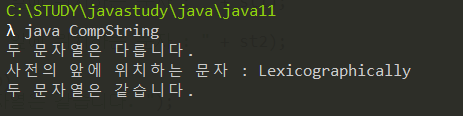
class CompString{
	public static void main(String[] args){
		String st1 = "Lexicographically";
		String st2 = "lexicographically";
		int cmp;

		if(st1.equals(st2))
			System.out.println("두 문자열은 같습니다.");
		else
			System.out.println("두 문자열은 다릅니다.");

		cmp = st1.compareTo(st2);

		if(cmp ==0)
			System.out.println("두 문자열은 일치합니다. ");
		else if (cmp < 0)
			System.out.println("사전의 앞에 위치하는 문자 : " + st1);
		else
			System.out.println("사전의 앞에 위치하는 문자 : " + st2);

		if(st1.compareToIgnoreCase(st2)==0)
			System.out.println("두 문자열은 같습니다. ");
		else
			System.out.println("두 문자열은 다릅니다. ");
	}
}
기본 자료형 값을 문자열로 바꾸기
static String valueof(boolean b)
double e = 2.1314234;
String se = String.valueOf(e);